Browser-safe workflow lab
Paste rough game notes, inspect how they are chunked, categorized, validated, and assembled into a production map.
Python local AI tool for game production planning
AYO Chat Agent v1 is a portfolio-ready software case study: a simple Python desktop app that loads design documents, runs a controlled local Ollama/Phi-3 pipeline, validates responses, categorizes useful details, and outputs a Markdown production map.
Paste rough game notes, inspect how they are chunked, categorized, validated, and assembled into a production map.
The lab demonstrates the orchestration contract deterministically in the browser. The private local Ollama model and production implementation are not shipped here.
Operate the public workflow contract directly: intake notes, watch each stage execute, inspect the production map, and review missing decisions.
The walkthroughs show the private local-model application, its architecture, test behavior, and packaged milestone without distributing the executable.
Game design notes are messy. Mechanics, lore, abilities, and production tasks get buried in the same document.
AYO converts design text into categorized production-map sections that are easier for a developer or small team to act on.
The showcase includes 28 passing tests, an interactive browser lab, UML diagrams, thumbnails, chapters, and milestone videos.
Software development, AI tooling, game tools, technical design, developer support, and instructional technology roles.
Long design documents mix mechanics, story, UI notes, systems, and production concerns. AYO helps turn raw design text into useful development categories.
The workflow combines a desktop interface, loader, chunker, local AI provider, response verifier, strategy-based categorizer, and production-map assembler.
This is controlled AI tooling, not a prompt demo. It shows architecture, validation, tests, packaging, and game production thinking working together.
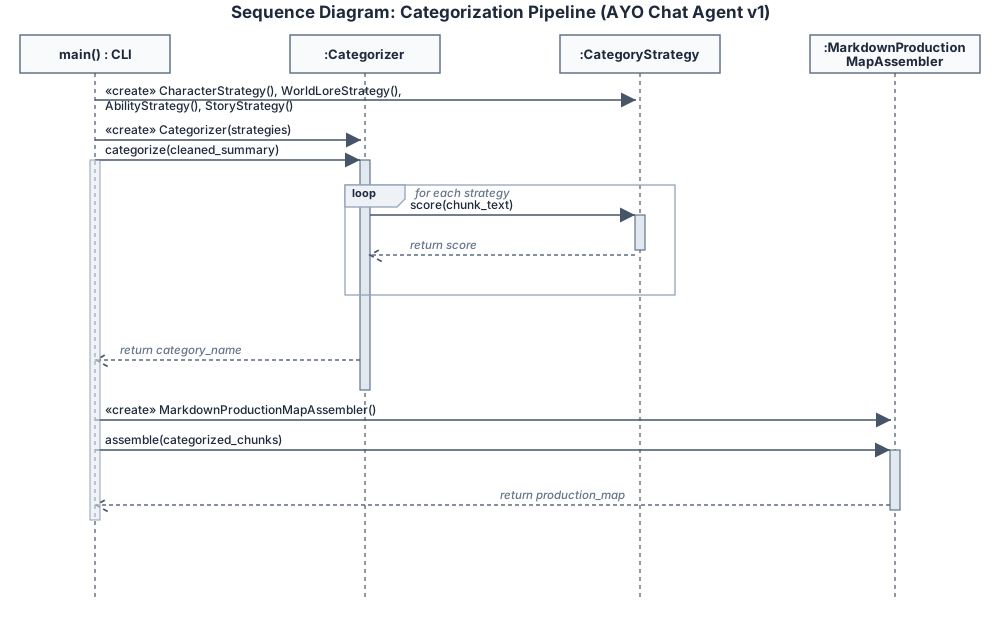
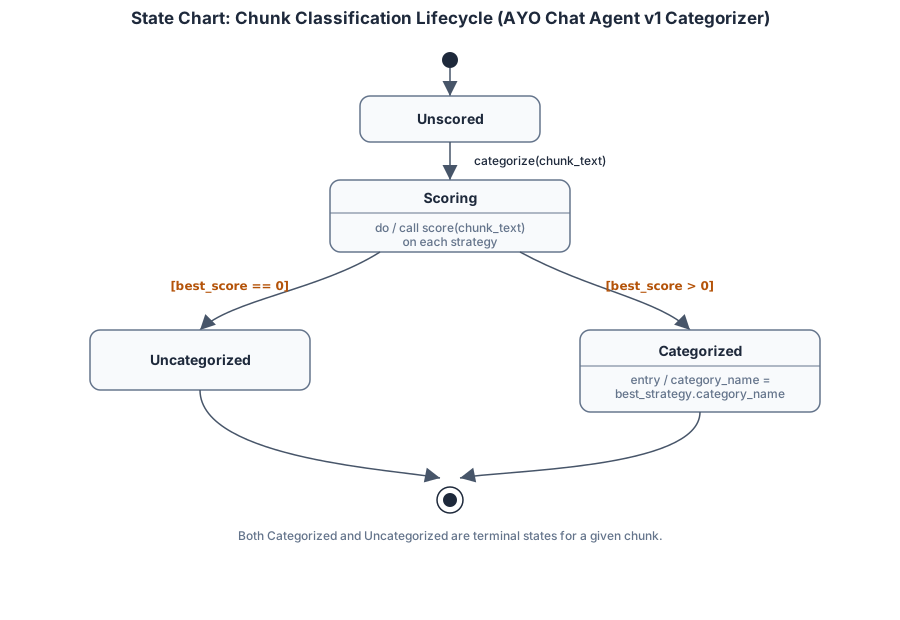
Clean technical diagrams are supported by additional generated UML and original exports on the diagrams page.
For a fast technical review, start with the final walkthrough, scan the diagrams, then use the testing video and README to confirm engineering discipline.
Shows the loader, chunker, verifier, build flow, and final milestone behavior.
Shows Strategy Pattern categorization and production-map assembly.
Shows repeatable tests, validation behavior, and development discipline.
Keep the local document-to-production-map experience stable, clear, and easy to test for reviewers and collaborators.
Add background running, local model status, and clearer visibility into when Ollama and Phi-3 are ready.
Build a first-run setup flow that walks users through Ollama install checks, model pull, and local configuration.
Expand into opt-in workstation support for tools like VS Code, Visual Studio, and creator-oriented local workflows.